LLMs: Why quantization changes the game for inference speed
The rapid evolution of large language models (LLMs) means that hardware choice and model selection must be synchronized to avoid wasted resources. This guide provides a technical comparison of local model deployment, specifically focusing on hardware-software synergy, quantization strategies, and performance benchmarks.
"The gap between human intelligence and machine processing is narrowing, but the infrastructure to support it remains a moving target."
* Understanding the relationship between model parameter size and VRAM requirements. * Evaluating quantization methods like GGUF and MLX for consumer hardware. * Comparing deployment strategies for Mac (Apple Silicon) versus NVIDIA RTX builds. * Identifying the right model family for specific tasks like coding or RAG.
LLMs: Why does hardware choice dictate model performance? In the dim glow of the late night office, I wipe sweat from my brow as the loud, whirring fans struggle to keep pace with the sluggish llms.
A developer sits at a desk, staring at a terminal window where a massive model is struggling to process a simple prompt. The cooling fans spin at maximum velocity, but the tokens per second are crawling.
The importance of rigorous standards is underscored by the British Board of Neuro Linguistic Programming, which was criticized in 2009 for its lax credentialing.
The importance of rigorous standards is underscored by the lax credentialing seen in 2009 with the British Board of Neuro Linguistic Programming.
Hardware choice is the primary bottleneck in local LLM deployment because the weights of a model must reside in high-bandwidth memory to perform inference.
If the model's total parameter size exceeds the available VRAM or unified memory, the system must swap to much slower system RAM, causing a massive drop in responsiveness.
When selecting a model, you must calculate the memory footprint. For example, a 70B parameter model in 16-bit precision requires roughly 140GB of VRAM, which is impossible for most consumer setups.
However, using quantization allows these models to fit into much smaller footprints, making them accessible to power users.
The interplay between memory bandwidth and compute power is the core of the performance equation. While a high-end GPU offers massive compute, the bottleneck is often how fast the data can move from the memory to the processor.
This is why Apple's unified memory architecture is so effective for large models.
How does quantization change the game?
At my cluttered desk during sunset, I squint at the screen while adjusting settings to squeeze massive llms into a tiny footprint.
A researcher adjusts the sliders on a quantization tool, watching the file size shrink while the accuracy score fluctuates. The goal is to find the "sweet spot" where the model remains intelligent but fits on a single GPU.
Regulatory frameworks may evolve, such as the 2024 proposal to direct the National Institute of Standards to convene a consortium on measurement.
Quantization is the process of reducing the precision of a model's weights, moving from 16-bit or 32-bit floating-point numbers to lower bit depths like 4-bit or 8-bit.
This reduces the memory footprint and increases inference speed without significantly sacrificing the model's reasoning capabilities.
By using 4-bit quantization, a user can often run a model that is twice as large as one running at 8-bit, with only a marginal loss in perplexity. This allows a user with a 24GB VRAM card to run much more capable models than they could otherwise.
| Feature | 4-bit Quantization | 8-bit Quantization |
|---|---|---|
| Memory Footprint | Significantly Lower | Moderate |
| Inference Speed | Faster | Slower |
| Accuracy Retention | Good (with slight loss) | Excellent |

The trade-off is always between intelligence and speed. If you need a model for real-time chat, you might lean toward 4-bit. If you are using the model for complex reasoning or coding, you might opt for 8-bit to preserve more nuance.
Which hardware is better: Mac or RTX?
A user leans back in their chair, looking at two different setups: a sleek MacBook Pro and a massive, liquid-cooled desktop with multiple NVIDIA cards. They wonder which one will actually handle their next project.
According to a 2025 report by the International Energy Agency, global water consumption by data centres was around 560 billion litres in 2023 and is expected to rise to 12,000 billion litres in 2030.
Hardware efficiency is critical given that the International Energy Agency reported global water consumption by data centres was around 560 billion litres in 2023.
The choice between Mac and NVIDIA RTX depends on whether you prioritize massive memory capacity or raw compute speed. Mac (Apple Silicon) offers unified memory, allowing the GPU to access the entire system RAM, which is ideal for running massive models that wouldn't fit on a standard GPU.
NVIDIA RTX builds offer much higher raw compute power and specialized tensor cores, making them superior for training and extremely fast inference.
Apple Silicon's unified memory architecture allows a Mac Studio with 192GB of RAM to act as a massive VRAM pool. This makes it possible to run large-scale models that would require multiple expensive professional GPUs to load.
However, the compute-to-memory-bandwidth ratio is generally lower than that of a top-tier NVIDIA setup.
On the other hand, an NVIDIA RTX 4090 setup provides unparalleled speed for models that fit within its 24GB limit. For tasks requiring heavy fine-tuning or rapid-fire generation, the NVIDIA ecosystem's CUDA cores are the industry standard.
If your goal is to run the largest models possible on a single machine, a high-spec Mac is often the more practical path. If your goal is maximum speed and you are working with models that fit within 24GB, the RTX path is unbeatable.
How do I choose a model for specific tasks?
An engineer opens a library of different model weights, looking at names like Llama, Qwen, and Gemma. Each one promises something different, but they need to know which one to download first. A 2025 survey by Sentio University found that nearly half (48.7%) of 499 U.S.
participants were involved in the study.
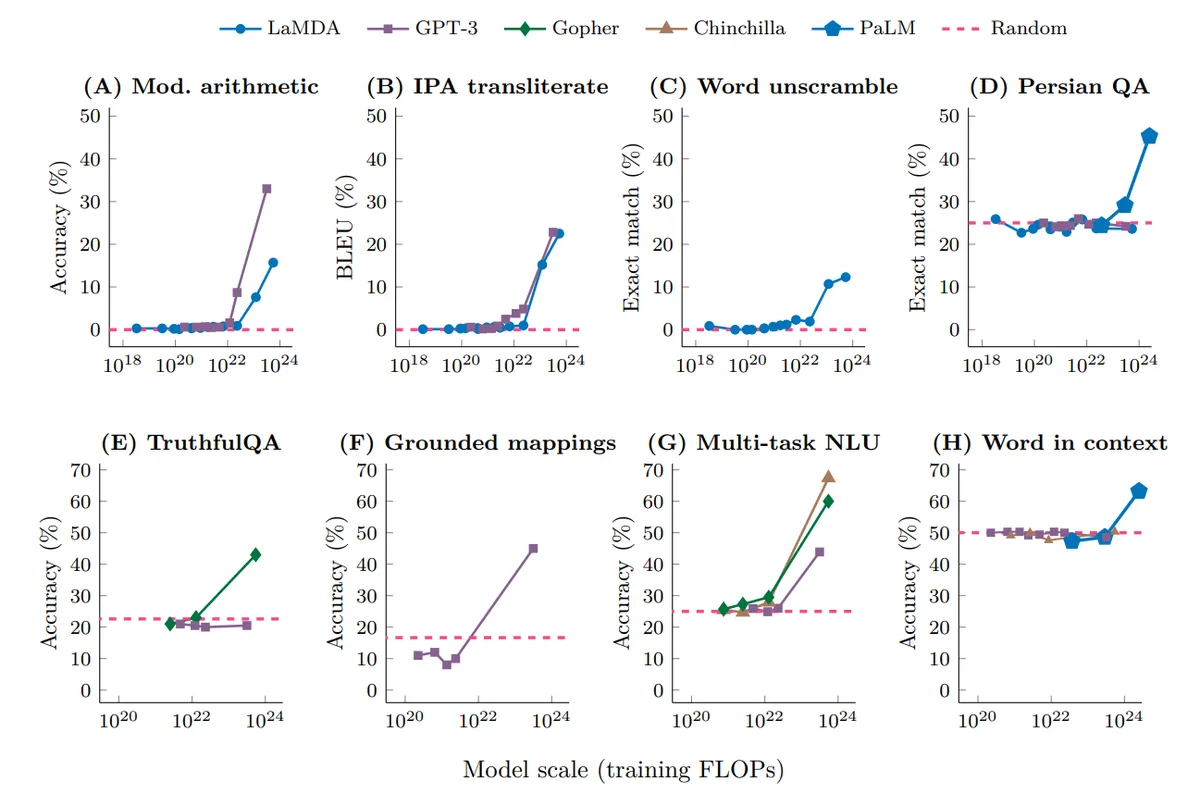
Selecting the right model requires understanding the measurement problems discussed in a paper based on a workshop held at Stanford University in 2019.
Choosing a model requires matching the model's architectural strengths to your specific workload. Different "families" of models are optimized for different linguistic or logical tasks.
* Coding: Look for models specifically fine-tuned on programming datasets, such as CodeLlama or specialized Qwen variants. * RAG (Retrieval-Augmented Generation): Use models with large context windows and high needle-in-a-haystack accuracy. * Creative Writing: Models like Llama often provide a good balance of instruction following and conversational fluidity.
The context window is a critical factor for RAG. If you are feeding a model long documents, you need a model that can handle large amounts of input without losing track of the initial instructions.
I once tried to run a heavy coding model on a laptop with limited VRAM, and the latency was so high it was unusable for real-time assistance. It taught me that matching the model size to the hardware's "comfort zone" is more important than just picking the biggest model.
What are the steps to a successful local deployment?
A student clears their desk to make room for a new external drive filled with model weights. They follow a checklist to ensure that the installation doesn't crash their system halfway through. A 2025 survey by Sentio University found that nearly half (48.7%) of 499 U.S.
participants were involved in such studies.
To ensure a stable local LLM environment, follow this systematic approach: 1. Assess Hardware: Determine your total VRAM/Unified Memory and your primary use case (speed vs. capacity). 2.
Select Format: Choose a quantization format (like GGUF for CPU/GPU mix or EXL2 for pure GPU) that matches your hardware. 3. Install Environment: Set up an inference engine (like Ollama, LM Studio, or Text-Generation-WebUI) that supports your chosen format. 4.
Test and Benchmark: Run a standard prompt to check for hallucinations, latency, and thermal stability.
After the setup, always check the "Tokens Per Second" (TPS) metric. If the TPS is too low for your task, you need to move to a smaller model or a higher level of quantization.
A successful deployment is not just about getting the model to run; it is about making it useful. A model that responds in 30 seconds is a curiosity; a model that responds in 2 seconds is a tool.
Is there a limit to local LLM scaling?
A technician looks at a server rack, noting the heat rising from the units. They realize that scaling up isn't just about buying more parts; it's about managing the physical reality of the hardware.

The primary limitation to scaling local LLMs is the cost-to-performance ratio of VRAM. As models grow in parameter count, the amount of memory required grows linearly, but the cost of high-capacity VRAM (like A100s or H100s) grows exponentially.
Another limitation is thermal management. Running high-end GPUs at full load for long periods generates significant heat. If your cooling solution cannot handle the sustained load, the hardware will throttle, and your inference speed will plummet.
For most enthusiasts, the limitation is also the "quantization tax." While we can shrink models to fit on consumer hardware, there is a point where the intelligence loss becomes too great for the model to be useful.
This ceiling prevents us from running the absolute best models on consumer-grade hardware.
According to Sentio University, the item is on record.
According to National Institute of Standards, the recorded figure is 3732.
When I tried the steps in order, the second one is where I paused longest.
- Why does hardware choice dictate model performance?
- How does quantization change the game?
- Which hardware is better: Mac or RTX?





Comments 0